Why Is a Social Login More Secure?
An Intro to OAuth With a Real World Example

I'm sure every developer would have written a demo login application at some point of time. We all start with the simple user defined ID and password. We then try to implement something like a social login as seen in the cover picture with say Google or Twitter.
There obviously is more of a complex process involved in setting up a social login but for a user its as simple as clicking a buttons to log in. The ease of not having to remember an ID/password and just being able to signup/login through the click of a button is extremely beneficial to the user
What if I Told You This Was Way More Secure? 😉
Social logins really help us achieve a few things:
- Support for multiple devices
- Single Sign On
- Simple to implement
- The ability to share data for users without having to release personal information
- Ability revoke an active session i.e not allow a third party access to the login and data
- There is no long lasting credentials being exchanged
So What Drives This Technology? 🤔
The underlying protocol used is something called OAuth. It is defined as:
An open protocol to allow secure authorization in a simple and standard method from web, mobile and desktop applications.
Now I'm sure with the basic understand of social logins and the above definition we get some idea into this but let me use a simple example to explain how OAuth works.
I remember my friend Sumedh describing it with an interaction between a Mother, Father and their Son. Imagine that the mother wants some grocery from market and she wants the son to buy it for her.
Before I go into the conversation let me set some context.
Mother: The user of the application
Son: Third party client or in technical terms the OAuth Client
Father: The Social Account or in technical terms the OAuth Provider
The conversation could possibly be as such:
Mother: Hey son, go to market and bring me some coffee powder. Take the required money from your father.
Son: Okay.
Son (OAuth client) goes to father (OAuth provider)
Son: Hey dad, mom told me to take money from you since she wants some things from market.
Father (OAuth provider) asks mother (User) about the permission to give money to their son (OAuth client)
Father: Hey, shall I give him the money and how much?
Authorization of your application takes place here.
Mother: Yes, please give it to him.
Permission grant by mother (User)
Son (OAuth client) gets the required things from market and returns them to mother (User). Here returning things to mother (User) can be thought of redirecting the user (or logging him) to the third party site.
For a more technical understanding of how this works in code Richard Schneeman has this amazing video below to enable you to understand:
Now Lets Put This All in Context
Let's take the example of the DEV Community. If you wanted to create an account on the DEV Community using twitter what would happen:
Basically if the Sign up with Twitter button exists then the initial setup between the OAuth Client (Dev.to) and the OAuth Provider (Twitter) is already done.
The Client triggers a permission grant page of the OAuth Provider based on the credentials it received from the initial setup. This looks something like below
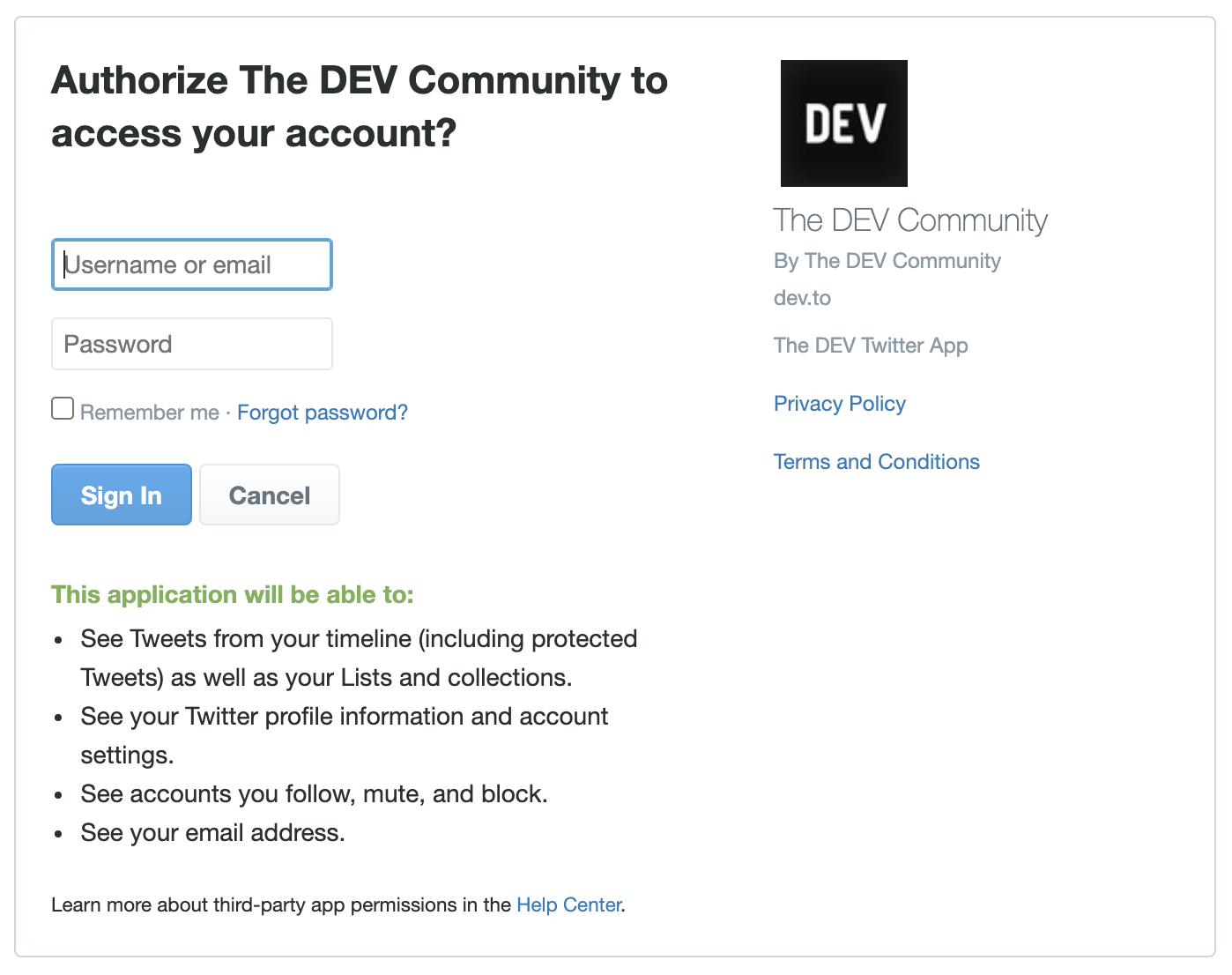
Once you login and grant the permission the OAuth Provider redirects you back to the client and the client gets a token to access your information from the OAuth Provider. This access token enables the client to get specific data from the provider
Based on that data the client then creates an account and logs you in
What Happens on the Successive Login?
Thats a good question. Now OAuth has multiple grant types and based on that we have different ways to get an access token from the OAuth Provider. For all subsequent logins the OAuth Client will hit the provider and generate a new access token to get access to the data and do the login.
Thus this enables us to achieve Single Sign On, the ability to share data for users without having to release personal information, ability to revoke access and the ability to not have long lasting credentials exchanged.
Conclusion
I hope this short blog post helps you understand why social logins are more secure than the traditional username/password. I will be writing about the different OAuth Grant types in the future and will be providing code examples as well.
Thanks for reading! I really hope that you find this article useful. I invite you to participate in the discussion in the comments below, I'm always interested to know your thoughts and happy to answer any questions you might have in your mind. If you think this post was useful, please like the post to help to promote this piece to others.
Thanks for reading! :)
About the author
- I’m a Staff Software Development Engineer at Trellix, where I work on the Platform Engineering Team to build secure, scalable solutions for enterprise and federal clients. My focus spans Marketplace, developer, and API initiatives, as well as cloud security management (ePO), ensuring reliability and strong application security across our cloud services. Previously, I helped Turtlemint scale its insurance platform from 20,000 to over 1 million agents, and gained diverse experience through seven internships, including at HackerRank. Outside of work, I love exploring new music, attending gigs, and playing football. I’m passionate about using technology to solve real-world problems and making a meaningful impact through my work.
Comments
Join the discussionNo comments yet. Be the first to comment.
Technical Articles
The Technical Articles series covers topics like online safety, authentication, encryption, Docker, API mocking, and cloud infrastructure. It offers practical insights and tutorials to enhance security and development workflows in modern tech.